
Cloud LLM providers like OpenAI and Anthropic are acting more like rigid appliance vendors, constantly dropping model quality in recent versions, controlling what you are allowed to run, and hitting your operations with ballooning token costs and persistent privacy risks. For manufacturing executives processing sensitive operational data, shipping proprietary specs and shop floor metrics to external servers is a nonstarter. But thanks to recent breakthroughs in open weight models like Qwen, alongside tools like Unsloth Desktop and Inkling, you no longer have to rely on the cloud to handle routine data processing tasks.
You can now stand up secure, high performance local AI infrastructure directly on your own hardware in roughly fifteen minutes, completely eliminating subscription caps and third party data exposure. This guide breaks down exactly how to match quantized models to your GPU hardware, configure local infrastructure, and process industrial data securely without sacrificing performance or bandwidth.
The Rising Cost and Risk of Relying on Cloud LLM APIs
Commercial APIs from providers like OpenAI and Anthropic are built on unpredictable foundations. Beyond the creeping subscription fees and restrictive usage limits, you face sudden quality drops in the latest versions and zero control over how your information is handled. Offloading routine token-heavy tasks to external servers turns your daily operations into a compounding data liability.
For manufacturing executives, shipping proprietary operational data, machine logs, and quality control metrics to third party clouds is a major security hazard. Moving to a local LLM deployment completely eliminates that vulnerability. By keeping processing entirely on your own infrastructure, you stop paying per-token fees while maintaining strict compliance over sensitive industrial assets.
What Local AI Tooling Actually Looks Like Today
Hardware requirements and VRAM limits
Running high performance language models internally requires a dedicated graphics card with adequate video memory. The rule of thumb is straightforward because the entire model must reside in memory to execute quickly. Smaller 9B to 12B parameter options need roughly 8GB to 12GB of video memory, while larger 27B to 35B configurations demand significantly more headroom to maintain long operational contexts.
For instance, running a full scale Qwen model requires about 56GB, which instantly exceeds standard consumer graphics hardware unless you are working with specialized unified memory architectures. To bridge this gap, modern deployments rely on quantization to compress model weights into lower precision formats. This trade off shrinks the memory footprint drastically while preserving output quality for everyday operational workflows.
Unsloth Desktop as a chat interface
Complex command line setups and multi step Python environments are no longer mandatory barriers to entry. Tools like Unsloth Desktop provide a native graphical application layer that serves the AI model directly through an intuitive chat interface. You simply select a quantized model that fits your hardware limits, configure the context window size, and launch the service locally.
This minimalist deployment path lets your engineering or operations teams spin up a private assistant in minutes instead of days. By turning on local network access within the application, multiple users across the facility can query the model securely without exposing plant floor data to outside networks.
How Quantization Makes Large Models Fit Consumer Hardware
Balancing context window size against model parameters
Uncompressed open weight models demand massive memory resources that typically exceed standard industrial workstations. A full scale Qwen model sits at around 56GB, which instantly rules out standard desktop graphics cards unless you rely on specialized hardware. Quantization solves this hardware barrier by compressing model weights and moving to a lower precision format.
Operations leaders must weigh model size against memory allocation for active context. Running a slightly smaller model with a 4 bit quantization leaves sufficient VRAM headroom for long operational documents and machine logs. Sacrificing a fraction of raw parameter size directly buys the memory needed to process multi page maintenance manuals simultaneously without crashing.
Assessing accuracy tradeoffs for operational workloads
Shrinking weights through quantization inevitably trades some precision for execution speed and hardware compatibility. The effect mirrors viewing the same photo stored at 8, 4, and 2 bits per pixel where model weights lose detail progressively. Certain analytical tasks tolerate this compression exceptionally well, while others demand higher precision levels.
Routine automation tasks like formatting shift reports or sorting maintenance tickets do not suffer from moderate quantization levels. Quality managers running local AI infrastructure should test specific shop floor tasks against different compression tiers to find the exact threshold where speed meets required output reliability.
Practical Application for Operations and Quality Teams
When you shift routine administrative processing to an internal environment, your team breaks free from external throttling. Operations managers frequently waste hours waiting on cloud queries or trimming prompts to stay under tight usage ceilings. By utilizing local AI infrastructure hosted directly on your local network, staff can offload token-heavy tasks without watching a meter or worrying about recurring subscription invoices.
Consider the daily drag of data collection and technical research. Quality managers often need to parse massive batches of equipment logs, maintenance histories, and compliance documents simultaneously. Pushing that volume through commercial APIs creates immediate cost spikes and security vulnerabilities. Running tools like Unsloth Desktop alongside models such as Inkling or Qwen keeps that high-throughput processing entirely within your facility.
The operational benefit extends directly to internal technical tasks. Facilities dealing with custom automation scripts or legacy PLC documentation can run local queries to accelerate troubleshooting. Instead of sending proprietary ladder logic or machine configurations to an external vendor, your engineering staff gets immediate code assistance behind your firewall. You eliminate the lag of external platforms while preserving complete ownership of your industrial data.
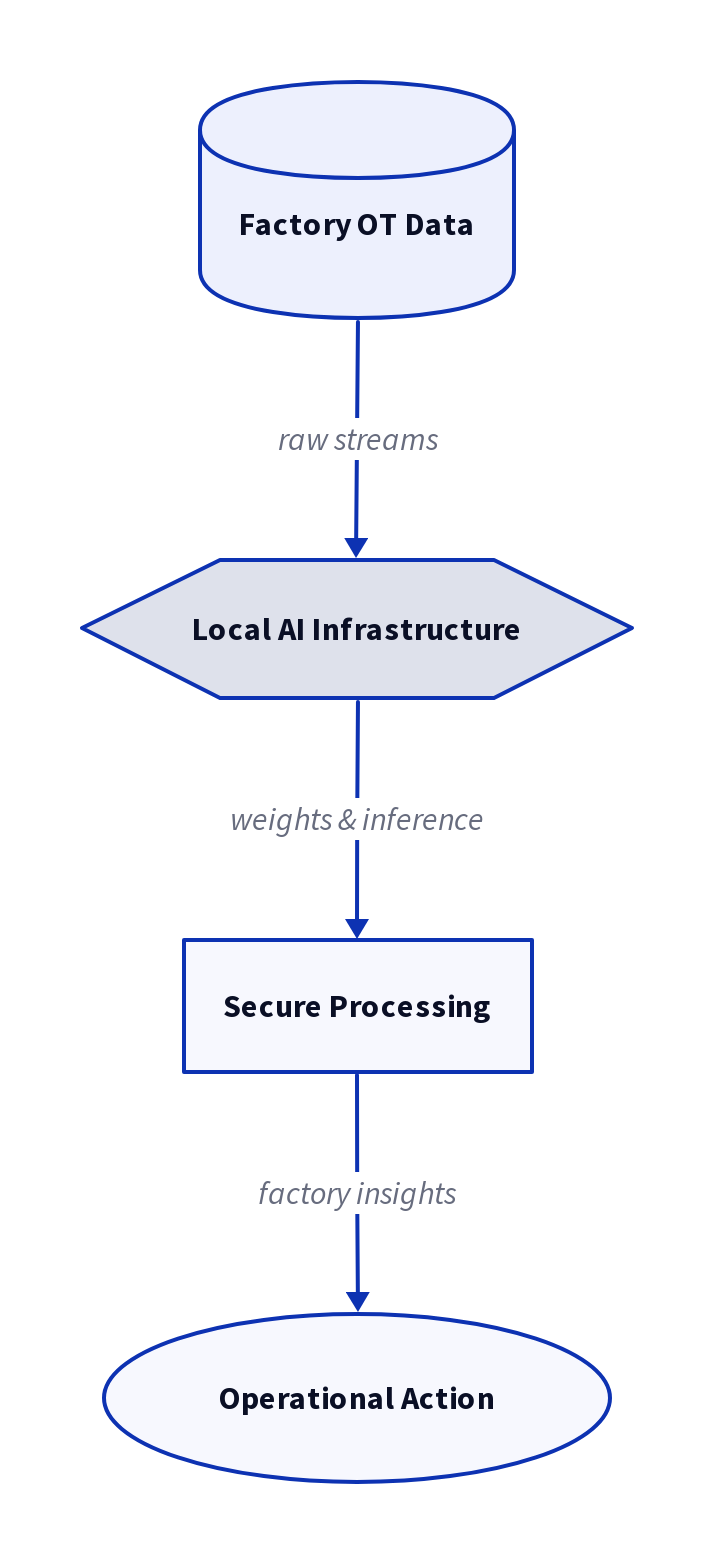
Factory floors generate continuous streams of vibration metrics, temperature readings, and sensor logs. Standard analytics dashboards display anomalies, but they rarely explain the underlying mechanical failure. Loading these raw telemetry logs into an optimized open model running locally gives maintenance personnel a direct diagnostic partner. A technician can paste three weeks of spindle vibration data into the local interface, asking the system to cross-reference those readings with previous bearing replacements. The model processes the local dataset immediately, identifying wear patterns before they trigger unexpected downtime.
Training specialized models on proprietary shop floor procedures no longer requires specialized cluster hardware or expensive cloud credits. Fine-tuning an open-source model on your facility’s specific standard operating procedures ensures that shift supervisors get accurate, context-aware answers regarding safety protocols or assembly steps. New workers can query the local system from a ruggedized tablet on the assembly line, receiving precise instructions derived straight from your internal documentation. This setup ensures that critical operational knowledge stays inside the building, ready to assist personnel regardless of internet connectivity or external service status.
Ready to find AI opportunities in your business?
Book a Free AI Opportunity Audit. It is a 30-minute call where we map the highest-value automations in your operation.
Retaining Complete Data Control Without Cloud Infrastructure
Manufacturing operations involve proprietary tolerances, custom tooling specifications, and proprietary workflow designs that never belong on external servers. When you rely on third party endpoints, every operational prompt creates a permanent audit trail outside your perimeter. Moving to an internal environment removes that exposure entirely.
Security teams waste countless hours vetting cloud vendors and redacting sensitive parameters before technical staff can run basic queries. Local AI infrastructure keeps everything contained inside your facility network. There is no external API logging your throughput metrics or scraping your internal process data for model training.
Predictability matters just as much as security on the shop floor. Commercial APIs subject your plant to sudden throttling, recurring subscription inflation, and unexpected service outages during peak production hours. Local deployment means your hardware runs reliably without anyone metering your daily token consumption.
Setting up a functional instance takes minimal effort once the underlying hardware is in place. As Jerry James notes regarding consumer implementations, once you have the hardware sorted, it takes about 10 to 15 minutes excluding download times to get an internal model up and running for your team.
Edge devices running these models connect directly to programmable logic controllers and legacy SCADA systems through standard industrial protocols. Engineers can query machine telemetry and maintenance logs using natural language without exposing proprietary sensor patterns to outside networks. Because the weights reside on local solid-state drives, response times remain under fifty milliseconds even during total internet outages.
Memory bandwidth dictates throughput more than raw GPU horsepower for these smaller architectures. Standardizing on consumer-grade graphics cards keeps capital expenditure low while delivering sufficient tokens per second for shift supervisors troubleshooting line stoppages. Plant technicians simply point a local endpoint script at a directory containing equipment manuals and parts catalogs. The system then indexes every PDF behind the firewall, allowing operators to diagnose hydraulic failures using historical maintenance notes stored safely on premises.
Source: gpupartner.com